How can several people answer one WhatsApp Business number?
On this page
Short answer
There are 4 ways. You can pass 1 phone around, or link up to 4 devices to the WhatsApp Business app. You can move the number to Meta’s API through a provider, which takes it off the app. Or connect it through a provider like Cosend: the app keeps working, and everyone answers from a computer.
What you need before you start
This guide connects your number to Cosend with coexistence. Coexistence is Meta’s name for one WhatsApp number that works in the app on your phone and through the API at the same time. Have these ready:
- The WhatsApp Business app on your phone, with your business number on it.
- A Cosend plan with the team inbox. A team inbox is 1 screen where your whole team sees and answers the same chats. Team plans start on Starter, at $14.95/month, with 3 people included. Cosend also has a free plan for 1 person. See pricing.
- The email address of each person you want to add.
- Time with the phone in your hand. The chat history import has to finish within 24 hours of connecting.
Meta decides inside its own setup screen whether a number can connect: the WhatsApp Business app must be version 2.24.17 or newer, the number needs recent real activity in the app, and coexistence is not yet available in every country. There is no way to check in advance; if Meta refuses, you see Meta’s reason on the spot.
How to do it in Cosend
- Create your Cosend account. The button says Create account.
- On the Numbers page, press Connect WhatsApp.
- On the Connect a number page, choose Keep WhatsApp on my phone. Read What changes on your phone first.
- Meta’s own setup screen opens. Enter the number on your WhatsApp Business app and follow Meta’s steps.
- In the WhatsApp Business app on your phone, tap Confirm to bring your chat history. Up to 180 days of chats come across.
- If you’re on the free plan, move to Starter or above. On Free, Members in Settings shows Upgrade to add teammates. with an Upgrade button.
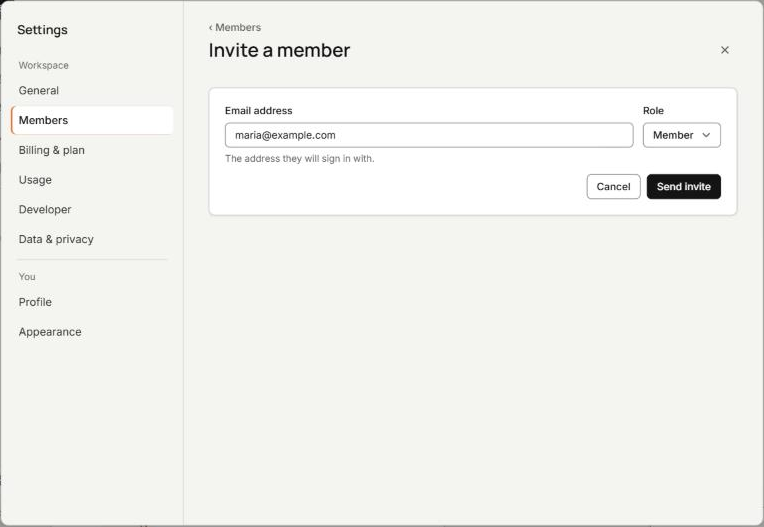
- In Settings, open Members and press Invite a member. Type the person’s Email address, choose a Role, then press Send invite.
- Each person opens the email, signs in, and sees the same chats you do.
Only an Owner or an Admin can invite people. Each person past your plan’s count is $5/month for each extra person, and Cosend shows the price before you send.
Why doesn’t the WhatsApp Business app work for a team?
The WhatsApp Business app is WhatsApp’s app for businesses, and it lives on 1 phone. To add people, you link devices. A linked device is a computer or second phone that you connect by scanning a QR code with your phone.
WhatsApp’s Help Center sets the limits, as of October 26, 2026:
- You can use up to 4 linked devices and 1 phone at a time.
- Linked devices work without your phone online, but they log out if the phone goes unused for over 14 days.
- Linked devices can’t create or view broadcast lists, share live location, or add status.
That’s 5 screens at most, all on the same WhatsApp account. Without WhatsApp’s multi-agent feature, the app can’t assign a chat to a person or show who sent a reply. Multi-agent adds both and allows up to 10 devices. It comes with a Meta Verified or Meta One subscription, and WhatsApp says the premium version may not be available to you yet.
What are the ways to share 1 WhatsApp Business number?
The WhatsApp Cloud API is Meta’s service for software to send and receive WhatsApp messages on your business number. Without a developer, you reach it through a provider: a company that connects your number and gives you an inbox.
| Option | People at once | App on your phone | Who answered what | What it costs |
|---|---|---|---|---|
| Pass 1 phone around | 1 | Keeps working | No record | Nothing extra |
| Linked devices in the WhatsApp Business app | 1 phone and 4 devices; up to 10 devices with multi-agent | Keeps working | Only with multi-agent | Part of the app; multi-agent needs a Meta Verified or Meta One subscription |
| WhatsApp Cloud API through a provider | Set by the provider | Stops: the number leaves the app | Depends on the provider | The provider’s fee, plus Meta’s charges per message |
| Coexistence through Cosend | 3 on Starter, 10 on Growth, 25 on Scale, and you can add more | Keeps working, with a few changes | Every reply shows who sent it | From $14.95/month for the team inbox, plus Meta’s charges for API messages |
Moving a number to the WhatsApp Cloud API alone takes it off the app. Meta’s developer docs (checked October 26, 2026) say a number already on WhatsApp can’t be registered unless it’s deleted first. With coexistence, Meta keeps your phone and Cosend in step on the same number.
A few things change in the app when you connect. Broadcast lists go read-only. Disappearing messages, view once and live location turn off in 1-to-1 chats. Linked devices are unlinked once, and you can link them again.
Meta’s coexistence page says replies you send from the WhatsApp Business app stay free. Cosend does not charge for WhatsApp messages. Meta bills your WhatsApp Business Account directly at their rates. We never mark them up, resell them, or hold your message credit.
Some tools drive WhatsApp Web from a browser instead. Those work outside Meta’s rules, and Meta can shut a number down for it.
Cosend cannot message WhatsApp groups. Meta’s API does not sync them. If your business runs in groups, we are not the answer today.
What does each person see?
Each person signs in to Cosend with their own email and sees every chat on the number. Picture a Wednesday. You’re at the supplier with the phone in your pocket, and Sara is at the counter computer. Here’s what Sara works with:
- Assignee on each chat, so every chat has a name on it. The Mine chip shows the chats assigned to her.
- Notes, beside the chat, for a note to a colleague.
- A line such as “Ali is replying in this chat” when a teammate holds the chat. She presses Ask to reply, and Ali chooses Let them reply or Deny. If Ali does nothing, the chat passes to Sara after a short countdown.
- On phone on a chat while you’re answering it from your phone, on a number with an automation switched on.
The team inbox opens in 1 window per person. If Sara opens it in a second window, Cosend shows Use here so she can move it there.
Cosend has 3 roles: Owner, Admin and Member.
How do you know who answered what?
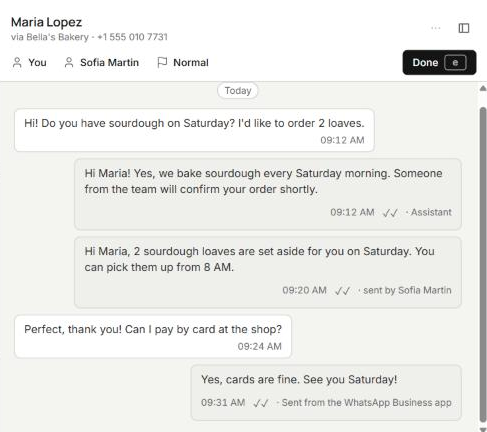
Every reply in a Cosend chat carries a label that says where it came from:
- sent by Sara for a reply a teammate typed in Cosend.
- Sent from the WhatsApp Business app for a reply sent from the phone.
- Assistant for an automatic reply from Cosend, such as the out-of-hours reply.
A reply sent from the phone shows up in the team inbox, so nobody answers a customer who’s already been answered. Each customer has a single chat and a single history, whoever replied. On Monday, the weekend’s chats are all there with who answered what, so the next shift knows what was promised.
When someone presses Done, the chat shows who pressed it and when. Chats brought over from your phone sit under a divider that reads Imported from WhatsApp, 180 days.
Compare that with the WhatsApp Business app on its own. There, only multi-agent shows which device or agent sent a message.
Common questions
Can 2 people reply to the same customer at once?
Not in Cosend’s team inbox. Whoever holds the chat replies, and a teammate presses Ask to reply to take it over.
Does the owner have to stop answering from the phone?
No. A reply sent from the phone shows up in the team inbox, so nobody answers a customer who’s already been answered.
Is there a way to share the number without paying?
Yes, the WhatsApp Business app lets you link up to 4 devices to 1 phone at no cost. Cosend’s free plan is for 1 person, so a team needs Starter, at $14.95/month.
Do my customers have to message a new number?
No. Customers keep messaging the number they know, and the number stays yours.
Sources
Spotted something out of date? Email hello@cosend.app.
Related guides
How do I answer WhatsApp Business from a computer without losing the app on my phone?
WhatsApp Web or a team inbox: how to answer from a computer and keep the app on your phone.
Updated ComparisonBest WhatsApp shared inbox tools for small businesses (2026)
7 WhatsApp team inbox tools compared by use case, with published prices, seats, trials and coexistence support.
Updated GuideCan I keep the WhatsApp Business app on my phone and use the API too?
Coexistence for owners: what stays on the phone, what changes, your chat history, and how to connect.
Updated