Can I keep the WhatsApp Business app on my phone and use the API too?
On this page
Short answer
Yes. Coexistence is Meta’s name for one WhatsApp number that works in the app on your phone and through the API at the same time. You connect through a provider like Cosend, in Meta’s own setup screen. Your chats stay on the phone, and a few app features change, such as broadcast lists going read-only.
What you need before you start
The API here is the WhatsApp Cloud API: Meta’s service for software to send and receive WhatsApp messages on your business number. To use it next to the app, have these ready:
- The WhatsApp Business app on your phone, up to date.
- The number you already use in the app.
- A Cosend account. Cosend has a free plan for 1 person, and plans for a team start on Starter at $14.95/month. See pricing.
- Your phone in your hand. You’ll tap a button in the app, and the history import has to finish within 24 hours.
Meta decides inside its own setup screen whether a number can connect: the WhatsApp Business app must be version 2.24.17 or newer, the number needs recent real activity in the app, and coexistence is not yet available in every country. There is no way to check in advance; if Meta refuses, you see Meta’s reason on the spot.
Meta’s developer docs list all 3 checks, as of October 26, 2026. They name the version rule, a refusal for numbers from some regions, and a refusal when the app needs more activity. Meta doesn’t publish a list of those regions.
How to do it in Cosend
- Create your Cosend account. The button says Create account.
- On the Numbers page, press Connect WhatsApp.
- On the Connect a number page, under Where is this number today?, choose On the WhatsApp Business app and press Continue. The other choices are for a number that isn’t on the app.
- On Get ready, read What changes on your phone, tick I’ve done all of the above, then press Continue. Meta’s own setup screen opens.
- Enter the number on your WhatsApp Business app and follow Meta’s steps.
- In the app on your phone, tap Confirm to share your chat history.
- Cosend shows Importing… while your chats come in, then Your history is in. You can leave the page; Cosend emails you when the import finishes.
Don’t skip step 6. Without Confirm, Cosend starts from today, and getting the history later means disconnecting and connecting again.
From then on, answer from the phone or from Cosend. Both see the same chat.
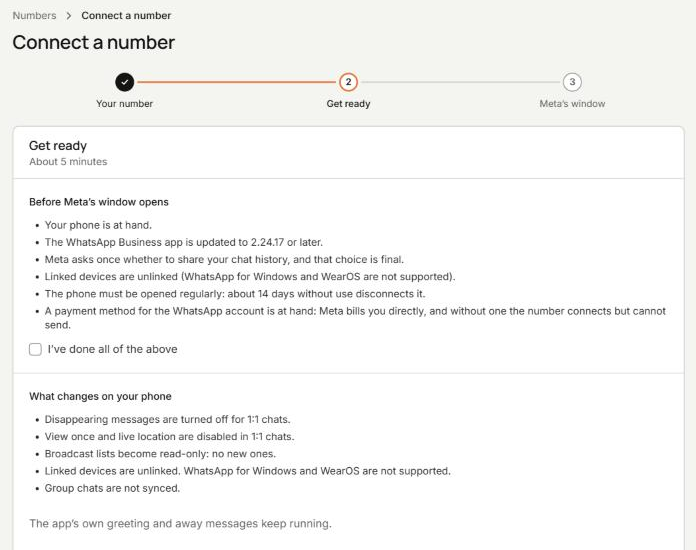
What keeps working on the phone, and what changes?
Coexistence is an official Meta feature, open to providers since February 11, 2025. Meta’s developer page lists every change, as of October 26, 2026. “In the app” means your phone. “Through the API” means what Cosend can do with the number.
| Feature | In the app on your phone | Through the API, in Cosend |
|---|---|---|
| 1-to-1 chats | Keep working, mirrored both ways | Yes |
| Contacts | No change | Yes, synced |
| Greeting message, away message, quick replies, labels | No change | Not available |
| Catalog, orders, status, business profile | No change | Not available |
| Voice and video calls | No change | Not available |
| Group chats and Channels | No change | Not synced |
| Broadcast lists | Read-only, and no new ones | Not available |
| Disappearing messages, view once, live location | Off in 1-to-1 chats | Not available |
| Linked devices | Unlinked once, then re-link any except WhatsApp for Windows and WearOS | Not applicable |
Meta says messages sent and received are mirrored between the API and the app. A reply from Cosend shows in the app on your phone, and a reply from the phone shows in Cosend.
Meta lists the app’s greeting message, away message, quick replies and labels as “No change”. They keep running in the app, but the API can’t use them. Cosend has its own out-of-hours reply, which runs through the API.
To message many customers at once, you send approved templates through the API instead of a broadcast list. Meta charges for those per message. Expect to sign in to WhatsApp Web once more after you connect.
Cosend cannot message WhatsApp groups. Meta’s API does not sync them. If your business runs in groups, we are not the answer today.
What happens to my chat history?
When you connect, you tap Confirm in the app and Meta sends your past chats to Cosend in 3 stages. First the last day, then up to 90 days back, then up to 180. Meta’s developer page describes the same 180 days, as of October 26, 2026.
It runs once, and it has to finish within 24 hours of connecting. Miss it, and the only way back is to disconnect in the app and connect again from scratch. That’s Meta’s rule, not ours.
3 more things to know:
- Photos and files come across only for messages from the last 14 days. Older ones import as text.
- Group chats aren’t imported.
- Your chats also stay on the phone, exactly as they were.
In Cosend, imported chats sit under a divider that reads Imported from WhatsApp, 180 days. Skipped the history? New chats work exactly the same with or without it.
Do I need to keep opening the app on my phone?
Yes, now and then. Meta’s developer page lists the phone being inactive for about 14 days as a reason the connection ends, as of October 26, 2026. That means the phone with the WhatsApp Business app on it.
Cosend watches your message traffic and warns you when a number goes quiet. The Numbers page also shows Last app activity for each number.
If the connection does end, your team inbox stays readable, your history stays where it is, and the app on your phone keeps working. Open the WhatsApp Business app, then press Reconnect on the Numbers page.
The same habit matters without Cosend. WhatsApp’s Help Center says linked devices on the WhatsApp Business app log out if your phone goes unused for over 14 days. So if WhatsApp Web already works for you, your phone routine won’t change.
What does the API add to the app?
With the number connected, Cosend works on it beside your phone:
- A team inbox, so your team answers from their own computers, and every reply shows who sent it. Team plans start on Starter, at $14.95/month.
- An out-of-hours reply, set once in your words.
- An AI receptionist that answers routine questions and hands the chat to a person when it’s not sure.
- Appointment reminders, and follow-ups for new leads.
- For whoever builds your systems: an API, webhooks, an n8n node and an MCP server.
Say a customer asks at 11pm whether you’re open on Sunday. The out-of-hours reply answers at 11pm, and the chat waits in the team inbox for the morning.
Meta’s 24-hour rule applies to messages sent through the API. Once a customer writes, you can reply without a template for 24 hours. After that, only an approved template can go. Meta says messages from the WhatsApp Business app aren’t bound by that window, so you can still answer from the phone.
Cosend does not charge for WhatsApp messages. Meta bills your WhatsApp Business Account directly at their rates. We never mark them up, resell them, or hold your message credit.
Common questions
Will my number be moved or re-registered?
No. Your number isn’t moved, resold or re-registered, and customers keep messaging the number they know.
Can I stop using the API later?
Yes. You disconnect in the WhatsApp Business app under Settings › Account › Business Platform › Disconnect Account, and the app keeps working afterwards.
Do replies from my phone cost anything?
Meta’s developer page says messages you send from the WhatsApp Business app stay free, apart from the app’s paid business broadcasts. Meta bills messages sent through the API to your WhatsApp Business Account.
Can every WhatsApp Business number connect?
Not every one. Meta checks each number inside its own setup screen and shows its reason if the answer is no.
Do I need a developer to connect?
No. If you can follow Meta’s setup screen and tap Confirm in the app, you can connect.
Sources
Spotted something out of date? Email hello@cosend.app.
Related guides
How do I answer WhatsApp Business from a computer without losing the app on my phone?
WhatsApp Web or a team inbox: how to answer from a computer and keep the app on your phone.
Updated ComparisonBest WhatsApp shared inbox tools for small businesses (2026)
7 WhatsApp team inbox tools compared by use case, with published prices, seats, trials and coexistence support.
Updated GuideHow can several people answer one WhatsApp Business number?
4 ways to put a team on 1 WhatsApp Business number, compared, and how to set it up in Cosend.
Updated