Best WhatsApp shared inbox tools for small businesses (2026)
Cosend wrote this page. The order is by job, not a ranking.
On this page
- Which WhatsApp shared inbox fits which business?
- Does the WhatsApp Business app keep working on my phone?
- What should you check before you choose?
- Which tool is best if your team works from a CRM?
- Which tool is best for marketing campaigns with AI agents?
- Which tool is best for turning chats into booked leads?
- Which tool is best if customers reach you on many channels?
- Which tool is best for clinics, studios and other booking businesses?
- What is the difference between a QR connection and Meta’s coexistence?
- Which tool is best if you want a choice of connection method?
- Which tool is best if you want to keep the app on your phone at a flat price?
- How did we compare these tools?
- How do I try Cosend’s team inbox?
- Common questions
- Sources
Short answer
No tool wins for every small business. If your team works from a CRM, look at TimelinesAI. Wati is built around campaigns, Gallabox around lead capture, and respond.io around many channels in one inbox. Whautomate suits booking businesses, and Wassenger gives you a choice of connection. Cosend is for small teams that keep the WhatsApp Business app on the phone and want a flat monthly price.
Which WhatsApp shared inbox fits which business?
A WhatsApp shared inbox is a screen where several people answer the same WhatsApp Business number, each from their own computer. Every tool below does that. They differ in what they add on top, how they charge for people, and how they connect your number.
The table shows the lowest plan each vendor publishes. We read every figure on the vendor’s own pages on October 30, 2026. Prices are in US dollars, except Wassenger’s, which its page shows in euros. They are before tax, and quoted the way each page shows them.
| Tool | Best for | Lowest published price | People in that price | Free plan or trial |
|---|---|---|---|---|
| TimelinesAI | Teams that work from a CRM | Starter: “$35/ seat a month”, or “$28 a month billed yearly” | 1 per seat, and “each connected number takes one seat” | “10-day free trial, no credit card required” |
| Wati | Campaigns with AI agents | Growth: “$59” a “month billed annually”, or “$69” “billed monthly” | “3 Users Included”, “No additional users” | “7 days free trial” |
| Gallabox | Turning chats into booked leads | Basic: “$112” “per month, billed annually”, or “$150” “per month, billed quarterly” | “3 users (hard cap)” | “Try Gallabox for free. No credit card required.” |
| respond.io | Many channels in one inbox | Starter: “$ 79 /month”, or “$948/yr (billed yearly)” | “5”, with “Additional Users at $12/month” | “free 7-day trial” |
| Whautomate | Clinics, studios and booking businesses | Engage, Plus size: “$79 /month”, or “$790/year” | “3 users”, then “$19 /mo” per extra user | “7-day free trial”, no card needed |
| Wassenger | A choice of connection method | Professional: “€39.90 /month”, or “€33.25 /month” billed annually | “3 agents included”, with “1 WhatsApp Business number” | “Start free for 7 days, no credit card.” |
| Cosend | Keeping the app on the phone at a flat price | Starter: $14.95/month | 3 people, then $5/month for each extra person per extra person | A free plan for 1 person |
Every pricing page here lists WhatsApp message fees as a separate cost. Respond.io’s pricing page also links to a WhatsApp pricing calculator. Read each section below for the vendor’s exact words on message fees.
Does the WhatsApp Business app keep working on my phone?
With every tool on this page, it can, through Meta’s coexistence. Coexistence is Meta’s name for one WhatsApp number that works in the app on your phone and through the API at the same time. The API here is the WhatsApp Cloud API, Meta’s official way for software to send and receive WhatsApp messages.
Meta’s developer documentation says it lets businesses “onboard using their existing WhatsApp Business app account and phone number.” The rules come from Meta, not from the vendors. A coexistence number has “a fixed throughput of 20 mps”, which means 20 messages a second. “Group chats will not be synchronized.” Chats from up to 180 days back can sync once, within 24 hours of connecting. In the app, disappearing messages, view-once and live location turn off for 1:1 chats, and broadcast lists become read-only.
Here is what each vendor says about coexistence and your past chats:
| Tool | Coexistence, in the vendor’s words | Past chats when you connect |
|---|---|---|
| TimelinesAI | “available on every plan; Meta decides eligibility per number during setup” | “Existing chat history stays on the phone”; history sync is “Coming soon” |
| Wati | “Use both the WhatsApp Business App and Wati’s Cloud API features with the same number” | “the last 6 months of chats” |
| Gallabox | “Gallabox’s AI agents, bots, and shared inbox are built to work with this onboarding flow” | “Up to 6 months of recent 1:1 chats” |
| respond.io | “connects your WhatsApp Business App to respond.io via the WhatsApp API using the same phone number” | “currently not supported” |
| Whautomate | “WhatsApp Business app coexistence on the same number”, on Engage plans | The inbox “starts fresh”, though its FAQ also mentions a history sync |
| Wassenger | On its Cloud API connection: “Supports coexistence mode with WhatsApp Business App” | “You can optionally sync your conversation history” |
| Cosend | Built on coexistence; the app on your phone keeps working | Up to 180 days, once, within 24 hours; files only from the last 14 days |
What should you check before you choose?
These 4 questions decide more than any feature list.
- How many people answer? Most tools here price per seat or cap users on each plan. The people column matters more than the headline price.
- How many numbers? TimelinesAI counts each connected number as a seat. Wati lists “Additional WhatsApp Numbers” at “$29/Month/Number”. Cosend’s Starter includes 10 numbers and Growth 25; Scale is unlimited, with fair use at 100.
- Do you work in WhatsApp groups? Meta does not sync group chats on a coexistence number. Cosend cannot message WhatsApp groups. Meta’s API does not sync them. If your business runs in groups, we are not the answer today.
- Will your number qualify? Meta decides inside its own setup screen whether a number can connect: the WhatsApp Business app must be version 2.24.17 or newer, the number needs recent real activity in the app, and coexistence is not yet available in every country. There is no way to check in advance; if Meta refuses, you see Meta’s reason on the spot.
Which tool is best if your team works from a CRM?
TimelinesAI. TimelinesAI syncs your WhatsApp chats to a CRM and gives the team a shared inbox. A CRM is the customer database a sales team works from. Its homepage headline says it connects the WhatsApp Business API and personal numbers to your CRM.
- Price: Starter is “$35/ seat a month”, or “$28 a month billed yearly”. Pro is “$49/ seat a month”. There is “No platform fee”, and “each connected number takes one seat, whichever way it is connected.”
- Trial: new workspaces “start with a 10-day free trial, no credit card required.”
- Connection: “Connect a number by QR code, through Meta’s official WhatsApp Business API, or both at once with Coexistence.”
- AI: “AI-powered auto-replies using ChatGPT”, a “ChatGPT-based chat summary”, and “WhatsApp MCP for Claude, ChatGPT, Cursor and any AI agent.”
- Message fees: “The only extra is Meta’s own per-message fee for template messages.”
Who it suits: sales teams whose day runs inside a CRM, and teams that mix personal and business numbers.
Which tool is best for marketing campaigns with AI agents?
Wati. Wati is a customer engagement platform for WhatsApp and other channels, built around broadcasts, chatbots and AI agents. Its homepage names “Astra AI Agents” that “run conversations end-to-end”, and it lists marketing, support and sales teams as its users.
- Price: Growth is “$59” a “month billed annually”, with “3 Users Included” and “No additional users”. Pro is “$119” a month billed annually, with “5 Users Included” and “Additional Users @ $39/user/month”. Billed monthly, Growth is “$69”.
- Trial: “7 days free trial, zero setup fees”.
- Message fees: “Additional charges apply for messages”, “Charged based on WATI rate card”.
- AI: “Wati AI credits” are a “$30/Month” add-on. Astra is an “Astra add-on, priced separately”.
- Coexistence: Wati’s coexistence page is headed “Two Apps, One Number, Fully Synced” and covers “the last 6 months of chats.”
Who it suits: teams that send campaigns and want AI agents answering, including on Instagram, which Wati’s homepage headline names.
Which tool is best for turning chats into booked leads?
Gallabox. Gallabox is a sales-focused messaging tool. Its homepage says: “Deploy AI agents on multiple channels that capture, qualify and move leads toward more bookings.”
- Price: Basic is “$112” “per month, billed annually”, or “$150” “per month, billed quarterly”, for “3 users (hard cap)”. The page shows no plan price billed month to month.
- Trial: “Try Gallabox for free. No credit card required. Get 500 AI credits to test on real conversations.”
- AI: “AI agents on WhatsApp and Instagram” and an “Inbox AI copilot” on Essential, and an “AI voice agent (WhatsApp + Phone)” on Advanced.
- Coexistence: “WhatsApp Coexistence isn’t switched on by default,” so ask Gallabox how to turn it on. “Up to 6 months of recent 1:1 chats can sync.”
- Message fees: the pricing page links to a separate page of conversation pricing. We did not check those rates.
Who it suits: sales teams that want an AI agent, or a voice agent, to qualify leads before a person steps in.
Which tool is best if customers reach you on many channels?
respond.io. Respond.io is a customer conversation platform. Its homepage says it “unifies all customer touchpoints and CRMs in a team inbox with AI Agents.” The headline reads: “Customers ask on chat. Call for details. Confirm by email. Can you keep up?”
- Price: the page’s own description lists “Starter ($79/mo), Growth ($159/mo), Advanced ($279/mo) & Enterprise.” Starter is “$ 79 /month”, or “$948/yr (billed yearly)”, with “5” users and “Additional Users at $12/month”. The page says “Pay only for the contacts you talk to.”
- Trial: “Enjoy a free 7-day trial.”
- AI: “AI Agents” and “AI Agent templates”.
- Coexistence: respond.io’s help article is dated October 28, 2026. It says coexistence “connects your WhatsApp Business App to respond.io via the WhatsApp API using the same phone number.” It adds: “Contact and message history syncing is currently not supported.” Messages sent from the app “may still count toward your respond.io Monthly Active Contacts (MAC) usage.”
Who it suits: consumer businesses that take chats, calls and email and want them in one place, in industries from retail to travel.
Which tool is best for clinics, studios and other booking businesses?
Whautomate. Whautomate calls itself an “AI omnichannel platform for local businesses.” Its headline reads: “Automate your chats, calls, bookings, reminders, orders, payments and follow-ups.” Its “built for” list names dentists, physiotherapists, and pilates and yoga studios.
- Price: Engage, in its Plus size, is “$79 /month”, or “$790/year”, with “3 team users”, “2,500 active contacts” and “5,000 template messages / month”. An extra user is “$19 /mo”. Add-ons start at “+$39/mo”, and Bookings is “Added together with CRM Suite”. Prices exclude local taxes, for businesses outside Singapore, Malaysia, Brunei and India.
- Trial: “7-day free trial”, with “No credit card needed”.
- Message fees: “You pay Meta’s published per-message rates directly, with no commission from us.”
- Coexistence: Engage plans list “WhatsApp Business app coexistence on the same number.” The coexistence page says the inbox “starts fresh from the moment Coexistence is enabled,” while its FAQ mentions a history sync. Ask which one applies.
- AI: “AI chatbot and AI reply assist”, plus “AI-to-human transfer”.
Who it suits: appointment-based local businesses that want bookings and WhatsApp in one tool.
What is the difference between a QR connection and Meta’s coexistence?
A QR connection links your WhatsApp account to software the way WhatsApp Web does. You scan a code from your phone, and the software mirrors your session. Meta’s coexistence works differently. It connects the number to the WhatsApp Cloud API through Meta’s own setup screen, while the WhatsApp Business app keeps working.
Wassenger offers both, and its help center compares them. WABA stands for WhatsApp Business Account.
| “WhatsApp QR” | “Cloud API (WABA)” | |
|---|---|---|
| Setup | “QR code scan” | “OAuth authentication with Meta” |
| Phone | “Phone must stay online” | “No phone required” |
| Session | “Mirrored session” | “Independent cloud account” |
| Groups, channels and polls | Yes | No |
| Templates and interactive buttons | No | Yes |
| Blocks | “Higher risk of temporary blocks if limits exceeded” | “Lower risk of blocks when following guidelines” |
The same help center lists coexistence under the Cloud API connection, not the QR one. Neither route suits everyone. A QR connection reaches groups, channels and polls. The Cloud API route reaches approved templates and buttons, and it runs under Meta’s own rules. If a vendor offers both, ask which route your number will use before you connect.
Which tool is best if you want a choice of connection method?
Wassenger. Wassenger is a WhatsApp team inbox and API with AI built in. Its headline reads “Make AI work at its best on WhatsApp,” followed by “One number. Your whole team. AI in every chat.”
- Price: Professional is “€39.90 /month”, or “€33.25 /month” billed annually, with “1 WhatsApp Business number” and “3 agents included”.
- Trial: “Start free for 7 days, no credit card.”
- Message fees: “Wassenger does not add any markup”, and “you’re billed by Meta at cost.”
- AI: “AI Assistant (ChatGPT)”, “AI Copilot” and “MCP integration (connect Claude, ChatGPT, any AI)” on every plan.
- Connection: the homepage FAQ says “You connect your current WhatsApp number by scanning a QR.” It also says Wassenger “connects your number to Meta’s official WhatsApp Business Platform.” Its coexistence page describes a QR scan from the app’s Linked Devices screen. If the connection type matters, ask Wassenger which one you will get.
Who it suits: developers who want a “REST API with 80+ examples in 15+ languages”. Also teams that need group chats through the QR connection.
Which tool is best if you want to keep the app on your phone at a flat price?
Cosend. Cosend is a team inbox for WhatsApp Business numbers, built on Meta’s coexistence. The app on the phone keeps working, and its replies show up in the inbox.
- Price: Starter is $14.95/month with 3 people and 10 numbers. Growth ($59.95/month) and Scale ($149.95/month) add people and numbers. Each extra person is $5/month for each extra person. Cosend has a free plan for 1 person.
- Message fees: Cosend does not charge for WhatsApp messages. Meta bills your WhatsApp Business Account directly at their rates. We never mark them up, resell them, or hold your message credit.
- AI: an AI receptionist recipe answers routine questions and hands the chat to a person when it is not sure.
- Developers: a Meta-compatible API, webhooks, an n8n community node and an MCP server, on every plan.
- Limits: Cosend cannot message WhatsApp groups. Meta’s API does not sync them. If your business runs in groups, we are not the answer today. Cosend cannot make or take WhatsApp calls. In the app, broadcast lists go read-only once you connect.
Who it suits: shops, clinics, restaurants and agencies where several people answer 1 or more numbers. Cosend is new: its About page says “There are no customers yet,” so there are no reviews.
How did we compare these tools?
We opened each vendor’s homepage and pricing page on October 30, 2026, plus the page where each one describes coexistence. Every price, limit and feature above is quoted from those pages. Each page is listed in the sources with that date.
- We list the lowest plan each vendor publishes, in the currency the page shows it in.
- Where a figure did not appear, we write “not published on the page we checked” instead of guessing.
- We did not sign up for trials, test the products or count reviews.
- We list each tool by the job it does best. The order is not a ranking.
- Cosend wrote this page. Cosend’s row comes from Cosend’s own site, so read it with that in mind.
Vendors change prices often, so check the vendor’s own page before you pay. Spotted something out of date? Email hello@cosend.app and we will correct it.
How do I try Cosend’s team inbox?
You need a WhatsApp Business number that’s on the WhatsApp Business app on your phone.
-
Open the Cosend sign-up page and press Create account, or Continue with Google.
-
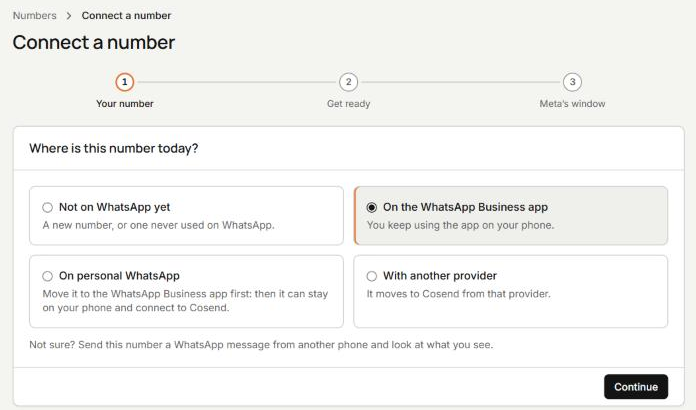
On the Connect a number page, under Where is this number today?, choose On the WhatsApp Business app and press Continue.
-
Under Get ready, tick I’ve done all of the above and press Continue. Meta’s window opens. Follow Meta’s steps for the number on your WhatsApp Business app.
-
When the app asks about your chat history, tap Confirm. Up to 180 days of chats import, once, and the import must finish within 24 hours. Files come across only from the last 14 days, and groups are not included.
-
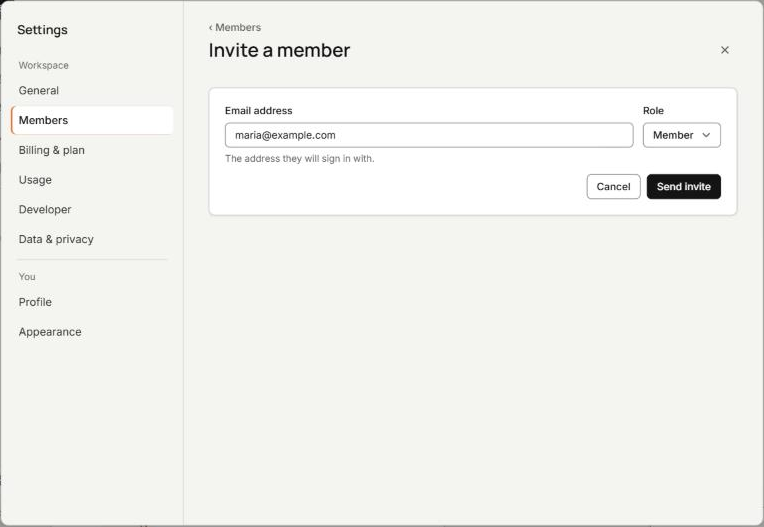
To add people, open Members in Settings, press Invite a member, fill in Email address and Role, and press Send invite. Starter includes 3 people.
Common questions
Which WhatsApp shared inbox is cheapest for a small team?
It depends on how many people answer, because most tools here charge per seat or cap users on each plan. Compare the people column first, then check how each vendor bills Meta’s message fees.
Which shared inbox tools let me keep the WhatsApp Business app on my phone?
All 7 tools here describe Meta’s coexistence on their own pages, and Wassenger offers it on its Cloud API connection. Meta decides inside its own setup screen whether your number can connect.
What is the difference between a QR connection and coexistence?
A QR connection mirrors your WhatsApp session on another screen, the way WhatsApp Web does. Coexistence connects the number to Meta’s WhatsApp Cloud API through Meta’s own setup, while the app keeps working.
Is Cosend the right choice for every small business?
No. If you want CRM sync, an AI voice agent or Instagram in the same inbox, another tool on this page fits better.
How often is this page checked?
Every vendor page here was read on October 30, 2026, and each source carries that date. If something is out of date, email hello@cosend.app and we will correct it.
Sources
Spotted something out of date? Email hello@cosend.app.
Related guides
How do I answer WhatsApp Business from a computer without losing the app on my phone?
WhatsApp Web or a team inbox: how to answer from a computer and keep the app on your phone.
Updated GuideCan I keep the WhatsApp Business app on my phone and use the API too?
Coexistence for owners: what stays on the phone, what changes, your chat history, and how to connect.
Updated GuideHow can several people answer one WhatsApp Business number?
4 ways to put a team on 1 WhatsApp Business number, compared, and how to set it up in Cosend.
Updated