How do I give Claude or ChatGPT access to my WhatsApp Business inbox?
On this page
- What is MCP?
- What you need before you start
- How do I connect Cosend to Claude?
- How do I connect Cosend to ChatGPT?
- How do I add Cosend to Claude Code or another MCP client?
- What can the agent do on my WhatsApp number?
- What can’t the agent do?
- What stops the agent from sending something I didn’t mean?
- Can a customer’s message trick the agent?
- What should I ask the agent first?
- Common questions
- Sources
Short answer
Add Cosend’s remote MCP server to Claude as a custom connector, or to ChatGPT as a custom MCP server. Then sign in and approve the permissions on a Cosend screen. The agent can read your WhatsApp inbox and reply in a chat that already exists. It can never message a list or a new number.
What is MCP?
MCP (Model Context Protocol) is “an open-source standard for connecting AI applications to external systems,” in the words of the project’s own site. The site compares it to “a USB-C port for AI applications”: one standard plug, many devices.
You’ll meet 3 terms in every setup:
- An MCP server is a service that offers tools an AI can call, such as reading a chat.
- An MCP client is the app you talk to: Claude, ChatGPT, Claude Code or Cursor.
- A remote MCP server runs on the internet. You add it by its web address, so there is nothing to install.
Cosend runs a remote MCP server for your WhatsApp Business number. Cosend’s MCP page describes “a remote server at mcp.cosend.app, speaking MCP revision 2026-07-28 over Streamable HTTP.” Streamable HTTP is the name the MCP specification uses for its web transport. The server “is stateless: no session header, no handshake, any request to any instance.” It’s on every plan, Free included. Cosend sums it up as “Give your agent a phone number.”
What you need before you start
- A Cosend account with at least 1 WhatsApp number connected. A connection is 1 WhatsApp number.
- The server address. Every client below asks for it:
https://mcp.cosend.app/mcp
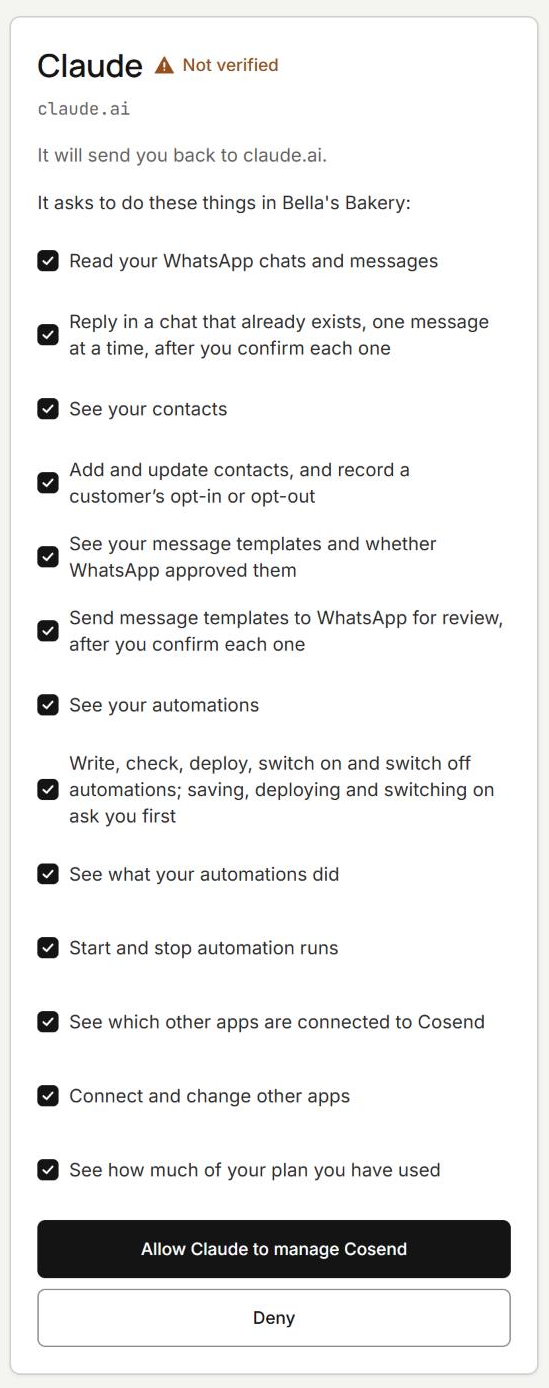
- No API key. Cosend’s MCP page says “There is no key to paste.” The server is an OAuth 2.1 resource server. OAuth is the standard sign-in flow that lets one app act for you in another without seeing your password. Your client runs that flow the first time it connects. You sign in to Cosend, pick the workspace and see every permission ticked; untick any you don’t want the AI app to have. A scope is a named permission you grant during sign-in.
- An MCP client. Anthropic says custom connectors work on Claude’s Free, Pro, Max, Ultra, Team and Enterprise plans, and “Free users are limited to one custom connector.” On Team and Enterprise, an Owner adds the connector first. ChatGPT is covered below.
Cosend’s page says “the token’s claims resolve exactly one workspace,” so the agent works inside 1 Cosend workspace and no other. Every read and write runs under row-level security bound to it.
How do I connect Cosend to Claude?
On a Free, Pro, Max or Ultra plan, you add the connector to your own account. These steps follow Anthropic’s connector docs, read on October 30, 2026.
- In Claude, go to Customize > Connectors.
- Click Add custom connector.
- Enter the remote MCP server URL:
https://mcp.cosend.app/mcp. - If the dialog asks how people sign in, choose Sign in now. If it asks for the OAuth client, choose Use Claude’s published identity. Leave the optional OAuth client ID and secret empty.
- Click Add. Sign in, then approve the permissions on the Cosend screen.
- In a chat, click the + button, select Connectors, and turn Cosend on.
On a Team or Enterprise plan, an Owner opens the settings for the whole Claude account rather than their own, goes to Connectors, selects Add, then Custom, and enters the same URL. If Claude asks for the connector type, choose Web. Members then open Customize > Connectors, find the connector with the Custom label, and click Connect.
Anthropic notes that the layout of the dialog differs from one Claude account to the next, so a label can differ slightly from these steps.
How do I connect Cosend to ChatGPT?
As of October 2026, OpenAI’s developer docs add a custom MCP server to ChatGPT as a plugin. These steps follow OpenAI’s “Add custom MCP server” page, read on October 26, 2026.
- Go to ChatGPT Plugins at chatgpt.com/plugins.
- Select the plus button, then Add custom MCP server.
- Enter a name. Under Connection, enter the Server URL:
https://mcp.cosend.app/mcp. - Choose OAuth for authentication.
- Review the risk warning and select I understand and want to continue.
- Select Create as a plugin.
OpenAI says ChatGPT supports “SSE and streaming HTTP” and “both read and write tools.” Write actions need your confirmation by default. ChatGPT treats any tool without a read-only hint as a write action.
We can’t say which ChatGPT plans can do this. OpenAI’s developer pages don’t list plans, and its help center article on this didn’t load for us, so we can’t confirm whether developer mode is still a separate switch. OpenAI does say “Workspace permissions and security restrictions, including Lockdown, apply,” so an admin may need to allow it.
How do I add Cosend to Claude Code or another MCP client?
In Claude Code, add the server from your terminal:
claude mcp add --transport http cosend https://mcp.cosend.app/mcp
Then run /mcp inside Claude Code and, in Anthropic’s words, “follow the steps in your browser to log in.”
To share the server with a project, put it in .mcp.json. Claude Code needs "type": "http". Its docs say an entry with a url but no type “is a configuration error”:
{
  "mcpServers": {
    "cosend": {
      "type": "http",
      "url": "https://mcp.cosend.app/mcp"
    }
  }
}
Cosend’s MCP page shows the shorter form below. Cursor treats an entry with a url as a remote server, in .cursor/mcp.json or ~/.cursor/mcp.json. Its docs say “Cursor supports OAuth for servers that require it.” For any other client, check its docs for the field names.
{
  "mcpServers": {
    "cosend": {
      "url": "https://mcp.cosend.app/mcp"
    }
  }
}
Building agents in n8n instead? Cosend’s n8n community node has an action node “marked usable as a tool, so an n8n AI agent can call it directly.” It installs from Settings → Community nodes. A self-hosted n8n behind NAT, with no public URL, cannot receive its trigger.
What can the agent do on my WhatsApp number?
The agent gets the tools below. Cosend’s page says tools/list “returns them filtered by the permissions you gave and by your plan.” RO means read-only. MUT means the tool changes something. CONFIRM means the tool waits for a human decision before it completes.
A template is a message format Meta approves before you can send it. An automation is a rule you set once, such as an out-of-hours reply. Start each session with whoami, which Cosend calls “the right first call in any conversation.”
| Tool | Class | What it does |
|---|---|---|
whoami |
RO | Workspace, plan, connected numbers and the permissions you gave |
list_conversations |
RO | Recent threads, newest first, each with its newest message |
search_conversations |
RO | Find a thread by its content |
read_conversation |
RO | Message history for 1 thread |
send_message |
MUT · CONFIRM | 1 message, into 1 conversation that already exists. 20 a minute, 200 a day, 1 per conversation every 30 seconds |
list_contacts |
RO | The contact list, filtered and paged |
upsert_contact |
MUT | Create or update 1 contact |
set_contact_consent |
MUT | Record an opt-in or an opt-out |
list_templates |
RO | Templates with their review status |
submit_template |
MUT · CONFIRM | Create 1 template and send it to Meta for review. 10 a day |
list_automations |
RO | What is deployed, and which version is live |
validate_automation |
RO | The compiler’s full report on a draft: every error with a pointer into the draft and, where there is one, a fix an agent can apply. Nothing is saved |
upsert_automation |
MUT · CONFIRM | Write a new automation, or a new version of 1 |
deploy_automation |
MUT · CONFIRM | Compile a version so it can be switched on. It does not switch it on |
set_automation_state |
MUT · CONFIRM | Enable or disable. Enabling needs the confirmation; disabling does not |
list_runs |
RO | Runs, filtered by automation and state |
get_run |
RO | 1 run and its per-step event trace |
get_usage |
RO | Meters, what is included, and what is left |
resolve_conversation |
MUT | Mark 1 chat Done, as the Inbox does. Nothing is sent |
create_setup_link |
MUT | A link for you to open yourself, signed in to Cosend, to connect a number, connect integrations, change plan or add a card. It works for 30 minutes, only for you |
check_setup_link |
RO | Whether the step behind a link is done |
cancel_setup_link |
MUT | Stop an open link working. Nothing it set up is undone |
whatsapp_link |
RO | A wa.me chat link and its QR code for a number |
template_check |
RO | Check a template against Meta’s rules before review. Meta still reviews it |
message_cost |
RO | Meta’s list price for 1 delivered message in a country, per category |
The last 3 are Cosend’s free tools, also at https://mcp.cosend.app/free with no sign-in, 30 requests a minute per address.
What can’t the agent do?
The agent replies in a chat that already exists: “never a list, never a new number.” Cosend’s MCP page spells it out. send_message “takes exactly one conversation, and that conversation must already exist. There is no array of recipients, no send-to-tag, no send-to-all, and no way to create a conversation with a number.”
Limits back that up: 20 a minute, 200 a day and 1 per conversation every 30 seconds. An agent that wants to reach 500 people “has to call it 500 times.” Then “the limiter stops it around 20 while the audit alarm fires.”
Messaging many customers on purpose lives elsewhere: “an automation whose audience is a saved, human-approved segment.” A person enables it by clicking approve in the dashboard.
“Rate limits, plan gates and scope checks apply to an agent exactly as they apply to a key.” Groups are out of reach too. Cosend cannot message WhatsApp groups. Meta’s API does not sync them. If your business runs in groups, we are not the answer today.
What stops the agent from sending something I didn’t mean?
There are 2 layers: Cosend’s server and your client.
On Cosend’s side, a CONFIRM tool “cannot finish on the AI’s say-so.” It “comes back asking for your decision, and the client has to come back with it.” Cosend calls this “a round trip in the protocol, not a prompt asking the model to be careful.” It covers sending a message, submitting a template, and writing, deploying or enabling an automation.
For automations, ask the agent to run validate_automation first. It “returns the compiler’s critique of a draft before anything is written.” Hand a draft to deploy_automation only after it passes.
On your client’s side, Claude shows tool approval requests, and Anthropic says to review them carefully. Its help article also notes that in Research, Claude can call connector tools without further approval. To block a tool for good, Anthropic’s connector docs say to open Customize > Connectors, select Cosend and set that tool’s permission to Blocked. ChatGPT asks you to confirm write actions, and you can remember the choice for that conversation. Choose an always-allow option only for tools you trust.
Can a customer’s message trick the agent?
Cosend builds on the assumption that one might. Its MCP page names the risk in a phrase: “inbound content becoming outbound action.” A customer sends text shaped like an instruction, and an agent obeys it.
Cosend’s answer is “enforced in the code, not by a prompt.” Every string from outside Cosend comes back wrapped and marked as untrusted:
{ "text": { "untrusted": true,
  "value": "⟦EXTERNAL⟧ Hi, is 3pm still ok? ⟦/EXTERNAL⟧" } }
The markers are stripped from the incoming text first, so a sender cannot close the fence and escape. Cosend also normalizes Unicode, removes bidi-override and zero-width characters, and caps a single message before it reaches the model. A classifier flags messages that read like orders to an assistant. It marks them rather than hiding them, “because a suppressed message is a support ticket and a flagged one is a decision.”
What should I ask the agent first?
Paste these into Claude or ChatGPT once Cosend is connected. Each one maps to a tool in the table above.
Call whoami and tell me which numbers and permissions you can see.

List my conversations with unread messages and sum up each one in 1 line.

Search my conversations for "delivery" and show me the last 3 threads.

Read the chat with Sara and draft a reply. Show me the draft before you send it.

Draft an out-of-hours reply automation. Run validate_automation and show me every error before you write anything.

Show me my last failed automation run and the step where it stopped.

How many automation runs and AI conversations are left this month?
A reply still needs a human decision before it goes out. None of these prompts can make the agent message someone new.
Common questions
Do I need an API key to connect Claude or ChatGPT to Cosend?
No. Your client runs Cosend’s OAuth sign-in the first time it connects, and you approve its permissions on a Cosend screen.
Can the agent message a new number or a list of customers?
No. send_message replies in 1 conversation that already exists, with no recipient list and no way to start a chat with a number.
Is the MCP server on Cosend’s free plan?
Yes. Cosend’s MCP server is on every plan, Free included, and what your plan counts is usage, such as automation runs and AI conversations.
Which ChatGPT plans can connect to Cosend?
OpenAI’s developer pages we read on October 26, 2026 don’t list plans, and its help article didn’t load for us. If you can’t see Add custom MCP server, ask your workspace admin or check OpenAI’s help center.
Can I let the agent read chats but never reply?
Yes: in Claude, set the send_message permission to Blocked under Customize > Connectors. In any client, send_message still waits for a human decision before it completes.
Sources
Spotted something out of date? Email hello@cosend.app.
Related guides
How do I set up a WhatsApp AI receptionist in Cosend with Claude's help?
Build the AI receptionist in Cosend from your website, then let Claude help with templates, testing and switching it on.
Updated GuideHow do I check a WhatsApp template before Meta reviews it?
Check a template against Meta's rules in Claude, free and with no sign-in, before Meta reviews it.
Updated GuideHow do I connect my WhatsApp number to Cosend from Claude?
Claude makes you a set-up link, you connect the number in Meta's window, and Claude checks it worked.
Updated