WhatsApp Business app vs API vs coexistence: which do you need in 2026?
Cosend wrote this page. The order is by job, not a ranking.
On this page
- What is the WhatsApp Business app?
- What is the WhatsApp Cloud API?
- What is coexistence?
- How do the 3 options compare?
- Which one should you pick if you work alone or with a small team?
- Which one should you pick with several locations, or as a developer?
- What does Meta charge for each option?
- What does a provider add on top of Meta’s fees?
- What can’t you do on a coexistence number?
- How to do it in Cosend
- Common questions
- Sources
Short answer
If 1 person answers from 1 phone, the WhatsApp Business app is enough. If software, AI or a big team must answer and you can give up the app, use the WhatsApp Cloud API through a provider. If you want both, use coexistence: the app keeps working on your phone while your team and automations work on the same number.
What is the WhatsApp Business app?
The WhatsApp Business app is Meta’s free-to-download app for small businesses, on Android and iPhone. It works like ordinary WhatsApp. It adds a business profile, lists for sorting your chats, and messaging tools such as a greeting message, an away message and quick replies.
Everything starts on 1 phone. You can link up to 4 more devices, such as WhatsApp Web on a computer, so a few people can answer. The phone doesn’t need to stay online. But if you don’t use it for over 14 days, the linked devices disconnect.
Meta also sells a multi-agent option through its Meta Verified and Meta One subscriptions. It raises the limit to 10 devices and lets you assign chats to people. Meta says this paid version may not be available to you yet.
For promotions, the app has business broadcasts. You pay Meta for each delivered message, and broadcasts are only offered in some countries so far.
What is the WhatsApp Cloud API?
The WhatsApp Business Platform is Meta’s service for businesses that message customers at scale. Its core is the WhatsApp Cloud API: an interface that lets software send and receive messages on your number. Developers can use it directly. Without a developer, you go through a provider: a company whose software adds a team inbox, automations or AI on top.
What you give up is the app. Meta’s rule is that a number already in use on WhatsApp must be deleted there before it can be registered on the Cloud API. Without coexistence, your number leaves the phone.
In return, a number can send up to 80 messages a second by default, and your provider decides how many people can answer. 2 rules shape your day. To start a chat, or to reply once 24 hours have passed since the customer last wrote, you need a template. A template is a message format Meta approves in advance. And you need a customer’s opt-in before you send them a template.
What is coexistence?
Coexistence is Meta’s name for one WhatsApp number that works in the app on your phone and through the API at the same time. It lets a business that already uses the app connect the same number to the Cloud API. You connect through a provider, in Meta’s own setup screen, not through a workaround.
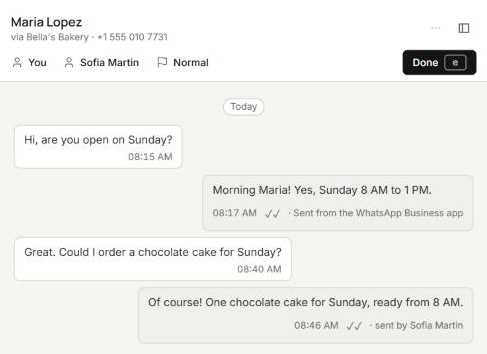
Once you’re connected, WhatsApp keeps both sides in step. A reply from the phone shows up in your provider’s inbox, and a reply from the inbox shows up on the phone. Meta can sync up to 180 days of past 1-to-1 chats, once, within 24 hours of connecting.
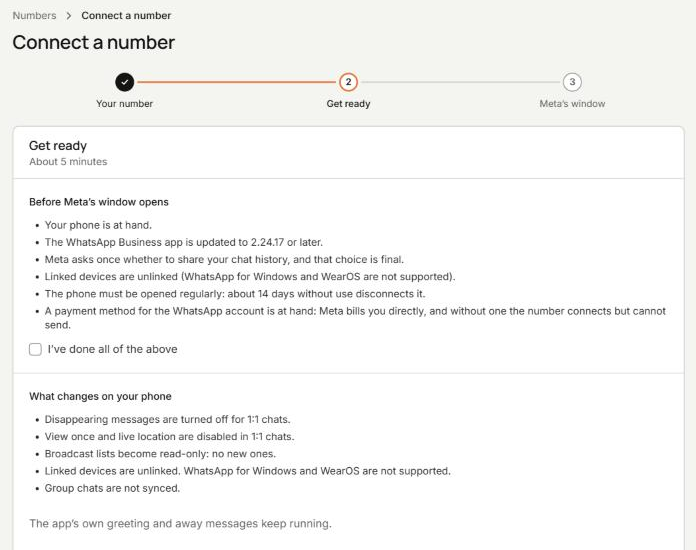
Meta’s own list of what changes on the phone:
- Disappearing messages turn off for 1-to-1 chats.
- View once and live location are disabled in 1-to-1 chats.
- Broadcast lists become read-only, and you can’t create new ones.
- Linked devices are unlinked. You can link them again, except WhatsApp for Windows and WearOS.
Meta lists the app’s messaging tools, such as greeting and away messages, quick replies and labels, as unchanged.
How do the 3 options compare?
Here they are side by side. “API” means the WhatsApp Cloud API through a provider, without the app. Every Meta fact comes from Meta’s developer docs and help center, checked October 26, 2026.
| WhatsApp Business app | WhatsApp Cloud API | Coexistence (both) | |
|---|---|---|---|
| Who can answer | You, and whoever holds a linked device | Your team in the provider’s inbox, automations, AI, your own software | Both, in the same chats |
| How many people | The phone plus 4 linked devices, or 10 with Meta’s paid multi-agent option where offered | Set by your provider’s plan | The phone and its linked devices, plus everyone in the provider’s inbox |
| Automations | Greeting message, away message, quick replies, labels | Whatever the provider or your code runs, up to 80 messages a second by default | The app’s tools stay, per Meta; the API side runs at a fixed 20 messages a second |
| AI | Meta Business Agent, for eligible businesses in some markets | Your provider’s AI, or Meta Business Agent | The API side’s AI, on the same number |
| Templates and broadcasts | Broadcast lists; paid business broadcasts in some countries | Approved templates to start chats and reach opted-in customers | Templates through the API; the app’s broadcast lists turn read-only |
| Cost model | Free to download; paid broadcasts and subscriptions | Meta’s fee per delivered message, plus the provider’s fee | App messages free; API messages at Meta’s API rates, plus the provider’s fee |
| The phone | Needed; use it at least every 14 days or linked devices disconnect | The number leaves the app | Keeps working; open the app about every 14 days or Meta ends the link |
| Groups | Yes | Meta’s Groups API: Official Business Accounts only, 8 people per group | Groups stay in the app only (see the limits below) |
| Chat history | On the phone | No import from the app | Up to 180 days of 1-to-1 chats, synced once, within 24 hours |
| Setup | Download the app and register your number | A Meta business portfolio, a display name, and a number not in use on WhatsApp | Meta’s popup through a provider; Meta checks the number first |
Which one should you pick if you work alone or with a small team?
Solo owner. If you answer every chat yourself, from your own phone, the WhatsApp Business app is enough. It costs nothing to download. Look at coexistence when missed chats start to cost you: the message at 11pm, the same 10 questions every day. That’s where an automatic reply or an AI receptionist on the API side helps, while you keep answering from the phone. Cosend has a free plan for 1 person. See what it includes.
Small team. 2 to 5 people on one number is where the app gets tight. Linked devices stop at 4, or 10 with Meta’s paid multi-agent option where it’s offered. Everyone also shares the phone’s account. Coexistence gives each person a login in a team inbox, and the owner keeps the phone. In Cosend, team plans start on Starter at $14.95/month, and you pay $5/month for each extra person.
Which one should you pick with several locations, or as a developer?
Several locations. Each branch often has its own number and its own phone. Coexistence lets every branch keep its phone while 1 team sees every chat. Cosend puts every number in one team inbox, with chats assigned by number and by person. Each plan’s number limit is on the pricing page.
Developer. If you build for clients, going to the Cloud API direct from Meta means no provider fee. You also build the inbox, the webhooks and the chat history yourself. With coexistence, your client keeps the app and you still get the API. Cosend’s API uses the same paths and payloads as Meta’s, so an existing integration switches by changing 1 hostname and 1 token. Cosend adds signed webhooks, an n8n node and an MCP server.
What does Meta charge for each option?
The WhatsApp Business app costs nothing to download. Meta says messages a business sends from the app continue to be free, even after it connects with coexistence. Business broadcasts and Meta’s subscriptions are the paid extras.
The Cloud API is billed per delivered message. Meta puts each message in a category: marketing, utility, authentication, service or Meta Business Agent. Messages customers send you are free. Since October 1, 2026, each business number gets 1,000 free service messages a month. After that, a service reply costs the same as a utility message in that country. Utility templates sent inside an open chat are no longer free.
For scale, take Meta’s US dollar rate card, effective October 1, 2026. For North America, it lists $0.025 for a marketing message and $0.0034 for a utility or service message. In the United Kingdom, the same messages cost $0.0635 and $0.022.
Coexistence mixes the 2. Replies from the phone are free, and messages through the API follow API pricing.
What does a provider add on top of Meta’s fees?
You pay Meta either way. The provider’s line is the part that differs. Providers charge for their software, and some charge for each message too. From their own pricing pages, checked October 26, 2026:
- Twilio charges $0.005 per WhatsApp message, inbound or outbound, on top of Meta’s fees.
- 360dialog starts at €49/month per number, plus Meta’s messaging fees.
- Wati’s plans start at $59/month, billed annually. Extra users on its Pro plan are $39/month each, and messages are charged on Wati’s own rate card.
A per-message fee grows with every chat you answer. A flat fee doesn’t.
Cosend charges a flat monthly fee for each plan. Cosend does not charge for WhatsApp messages. Meta bills your WhatsApp Business Account directly at their rates. We never mark them up, resell them, or hold your message credit.
Cosend has a free plan for 1 person, and plans for a team start at $14.95/month.
What can’t you do on a coexistence number?
Groups decide it for many businesses. Cosend cannot message WhatsApp groups. Meta’s API does not sync them. If your business runs in groups, we are not the answer today. Meta’s Groups API is limited to Official Business Accounts and 8 people per group. Meta says it isn’t available for WhatsApp Business app numbers.
Meta’s other limits:
- Voice and video calls, the catalog, orders and Status updates aren’t supported through the API. All of them keep working in the app.
- A coexistence number sends at a fixed 20 messages a second.
- Chat history syncs once. Miss the 24 hours and you disconnect and start again.
- Open the app on the phone regularly. Meta ends the link after about 14 days without it.
Meta decides inside its own setup screen whether a number can connect: the WhatsApp Business app must be version 2.24.17 or newer, the number needs recent real activity in the app, and coexistence is not yet available in every country. There is no way to check in advance; if Meta refuses, you see Meta’s reason on the spot.
How to do it in Cosend
These steps connect the number on your WhatsApp Business app and keep the app working on your phone.
- Create your Cosend account. The button says Create account. Cosend has a free plan for 1 person.
- On the Numbers page, press Connect WhatsApp. On the Connect a number page, answer Where is this number today? with On the WhatsApp Business app and press Continue. Tick I’ve done all of the above and press Continue.
- Meta’s window opens. Enter the number that is on your WhatsApp Business app, then follow Meta’s steps.
- On your phone, tap Confirm in the WhatsApp Business app to bring your chat history with you.
- Wait for the import. The page shows Importing… until it reads Your history is in. It runs once and brings up to 180 days of chats.
- To bring in your team, open Members in Settings, press Invite a member, then Send invite. Adding people needs a team plan, from Starter.
- For messages after a chat’s 24-hour window closes, open Templates, press Create template, fill it in, then press Create template again to send it to Meta for review.
Common questions
Can I use the WhatsApp Business app and the API on the same number?
Yes, through Meta’s coexistence feature, which you set up with a provider in Meta’s own setup screen. The app keeps working on your phone while the API works on the same number.
Does the WhatsApp Business app cost anything?
The app is free to download, and Meta says messages you send from it stay free, even with coexistence. Business broadcasts and Meta’s paid subscriptions are the extras you can pay for.
How many people can use one WhatsApp Business app number?
The phone plus up to 4 linked devices, or up to 10 devices with Meta’s paid multi-agent option where it’s offered. With coexistence, your provider’s plan sets how many people can answer in its inbox.
Do I lose my chats when I connect with coexistence?
No, your chats stay on the phone exactly where they are. Meta can also sync up to 180 days of 1-to-1 chats to your provider, once, within 24 hours of connecting.
Is coexistence an official Meta feature?
Yes, coexistence is Meta’s own feature, and you connect in Meta’s own setup screen. It isn’t a workaround that drives WhatsApp Web from a browser.
Sources
Spotted something out of date? Email hello@cosend.app.
Related guides
How do I answer WhatsApp Business from a computer without losing the app on my phone?
WhatsApp Web or a team inbox: how to answer from a computer and keep the app on your phone.
Updated ComparisonBest WhatsApp shared inbox tools for small businesses (2026)
7 WhatsApp team inbox tools compared by use case, with published prices, seats, trials and coexistence support.
Updated Developer guideHow do I give Claude or ChatGPT access to my WhatsApp Business inbox?
Add Cosend's MCP server to Claude, ChatGPT or Claude Code so an agent can read your inbox and reply in a chat.
Updated